The Rapide Block Mode option supports the generation of a browser user interface directly from the Gen block mode screen design.
The advantages of replacing a block mode screen interface with a browser UI are many, including:
- increased ease of use for the end users
- better integration with other applications
- enhancing the functionality and productivity of the application
- migrating the application to a new platform
Whilst many organisations have a desire to replace block mode interfaces, often the high cost, timescale, user disruption and risk involved make the business case for the transition very hard to justify. In the past, the conversion of a block-mode application to a web or GUI UI has required transformation of the block-mode design to a GUI design, and because the functionality of the Gen block mode and GUI designers differs in several fundamental ways, the transformation involves considerable development effort to re-design the application as well as a fundamental change in the behaviour of the application from the user’s perspective.
But what if you could implement a new web UI very quickly and with very little change to the models and behaviour of the application and then have the facility to incrementally transition selected screens to a full function web UI whilst having the ability to retain the existing screen designs unchanged?
The solution provided by the Rapide Block Mode option is to utilise the existing block mode screen designs to generate a web user interface without requiring any changes to the screen design in the Gen model. This means that the developers continue to use the skills & tools that they are familiar with, and the application fundamentally behaves the same from the user’s perspective. Read about TAP Air Portugal's successful conversion project.
With support for enterable list boxes, function key assignment, MAKE statements, command input and more, Rapide ensures that the application will continue to behave in a similar way to the block mode screens without requiring a re-design.
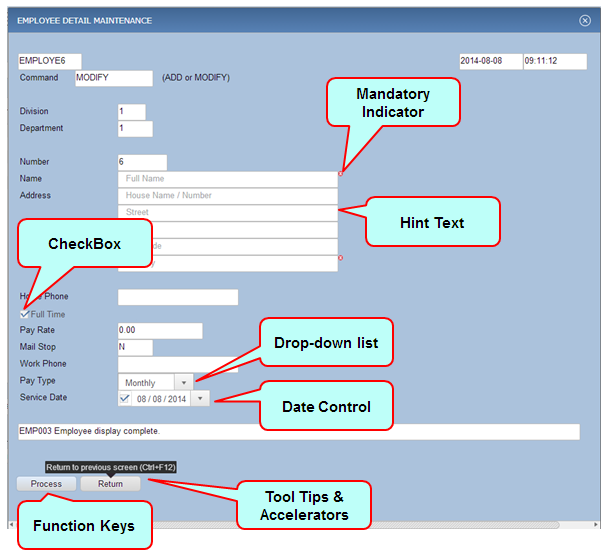
With Rapide you can also easily enhance the user interface by introducing control enhancements like checkboxes, drop-downs, date picker controls, hyperlinks, etc. These are specified using the Rapide Designer plug-in and do not require any changes to the screen design.
Furthermore, if there are certain screens that would benefit from more extensive improvements, these can be enhanced with a more sophisticated GUI design whilst the remainder of the application uses the block mode screens. The conversion to a window design is automated by the Rapide Designer plug-in and unlike a standard transformation to a GUI window, the Rapide approach still supports all of the block mode features in the transformed window design.
This mix and match approach offers the best of both worlds – a quick, low risk and quick conversion to a web UI whilst also allowing selective enhancement of screens where there is a business benefit that will justify additional development effort.
The Rapide Block Mode option allows you to either leave your existing procedure steps unchanged, or they can be automatically converted to a client/server architecture to allow the procedure step logic and database access to remain on the current server platform (e.g. CICS or UNIX) whilst the client user interface resides on a web application server.
The example below shows some simple enhancements to the Gen sample model screen, using checkboxes, date control, drop-downs, hints and mandatory indicators and function key mapping to enhance the usability of the application in a browser window.